PeachSim: a clean room iOS and Android simulator
October 26, 2026PeachSim runs iOS and Android apps without booting a mobile operating system image. It implements the native interfaces apps call for views, text, input, and animation, and renders each frame through a C++ compositor on Skia Graphite and WebGPU, so animations keep moving while app JavaScript is busy. Swift apps compile to WebAssembly against PeachSim’s UIKit and SwiftUI, Kotlin and Compose apps follow at an earlier stage, and React Native JavaScript runs unchanged. It runs in a browser and as a native app on Mac, Linux, and iPhone, and its output is measured against Apple’s and Google’s simulators.
Running without a system image
Running a mobile app on a development machine normally takes a vendor IDE, language toolchains, and multi-gigabyte system images. PeachSim needs none of them. A cold boot downloads 14.5 MB, where the iOS simulator runtimes on one Mac occupy 22.5 GB.
We started in March 2026, after a coding agent wiped the drive of our development machine and running our apps again meant reinstalling Xcode and its simulator runtimes, CocoaPods, Android Studio, the Android SDK and emulator images, and a Java toolchain. A browser prototype worked within days. Matching native rendering and reaching 120 Hz took the next seven months.
Disk compares the simulator runtimes and devices installed on one Mac with PeachSim’s cold-boot download. Cold start compares Apple’s simctl booting an empty device with PeachSim reaching the first app screen.
The system boundary
An app meets the operating system at a framework boundary, where it calls system APIs for views, layout, text, and input. PeachSim implements those frameworks and the renderer beneath them.
Native and React Native apps cross the same boundary. Swift compiles to WebAssembly against PeachSim’s UIKit and SwiftUI, and Kotlin and Compose take the same path on Android. React Native is furthest along because its application logic is already JavaScript.
Design requirements
- 01Run application code unchangedReact Native JavaScript (with Fabric and Yoga), third-party package JavaScript, and app Swift source run unmodified. Where react-native-web swaps native views for DOM elements, PeachSim supplies only the native side.
- 02Match operating system behaviorSpring physics, scroll deceleration, CoreText metrics, keyboard geometry, and Liquid Glass shaders follow iOS and Android. Where behavior is undocumented, we measure the real operating system.
- 03Build in a clean roomPeachSim contains no Apple or Google operating system code. It is built from public documentation, upstream open source (React Native, Yoga, Skia, and swift-foundation), and black-box observation. A separate researcher writes behavioral specifications, so proprietary code and decompiled output never enter the repository.
- 04Run without a system imageNo hypervisor and no vendor toolchain. The same engine runs in a browser tab, on a headless CI runner with no GPU, and as a native app on Mac, Linux, and iPhone.
- 05Hold 120 Hz and match native pixelsAnimations advance at the display’s full refresh rate, up to 120 Hz. Accuracy claims are checked pixel for pixel against Apple’s and Google’s simulators.
Engine architecture
PeachSim splits the app, the system UI, and rendering across three workers, as iOS separates an app process from the system shell and the render server. Only the compositor worker talks to the GPU, so scrolling and native-driven animations hold full frame rate while application JavaScript is blocked.
The tenant worker, one per running app, executes its JavaScript and writes Yoga layouts into shared memory. The shell worker runs system UI and acts as the main thread for hit-testing. The compositor worker owns the retained scene and the GPU.
Native-driven animation
In a native-driven animation, JavaScript declares the curve, spring parameters, and target value once. The compositor samples it on each display tick, as Core Animation does on iOS, with zero JavaScript calls per frame.
On iOS, starting a spring moves the view’s model layer to its destination at once, while Core Animation steps a presentation layer along the curve and hit-tests touches against it. PeachSim keeps both positions in shared memory. The app reads the settled one, and the shell and compositor step and hit-test the moving one.
- 1React commits the app’s update.
- 2Yoga computes the new layout.
- 3The shell forwards the update to the compositor.
- 4The compositor advances the animation.
- 5The compositor redraws only what changed.
- 6The GPU presents the submitted frame.
Retained compositing and damage tracking
The C++ compositor retains the scene across frames and keeps at most three frames in flight to the GPU. A static screen submits nothing, and a moving frame redraws only the bounds of the nodes that changed. A transformed subtree that stops changing is recorded as a picture and cached as a GPU texture, within a rasterization budget of 3 ms per frame.
Rounded clips used to dominate transient GPU memory. One navigation transition allocated 150 mask textures for continuous corners and peaked at 263 MB. The compositor now clips those corners in the shader with a signed distance field, a function that gives each pixel’s distance to the shape’s edge, and recycles scratch textures across passes.
Text, layout, and view fidelity
Much of the engine is small platform rules, each of which showed as a pixel error against native until it matched. Text uses CoreText metrics and the iOS Dynamic Type size tables, with unhinted glyph outlines and fractional advances placed on device pixels. SwiftUI labels hyphenate where UIKit does.
Layout rounding follows the installed React Native version exactly, down to the 0.001 pt epsilon added before rounding up and the invisible capital “I” that an empty Fabric Text node measures to reserve one line. Three-dimensional transforms keep perspective and flatten at view boundaries as Core Animation specifies. Web views mount as live browser frames beneath native transforms, clips, and glass.
Accuracy
Every conformance claim comes from running the same bundle and input script twice, once on Apple’s or Google’s simulator and once in PeachSim, and comparing the captures automatically. A published verdict expires after 30 days, or sooner if its source changes.
Test scripts pause at named checkpoints, where the harness records both runs. A visual checkpoint compares screenshots pixel for pixel, a semantic checkpoint compares structured records such as the app’s event log, and a hybrid checkpoint requires both. When we extended visual comparison to the whole screen in August, 7 of 339 passing cases became failures.
Real apps
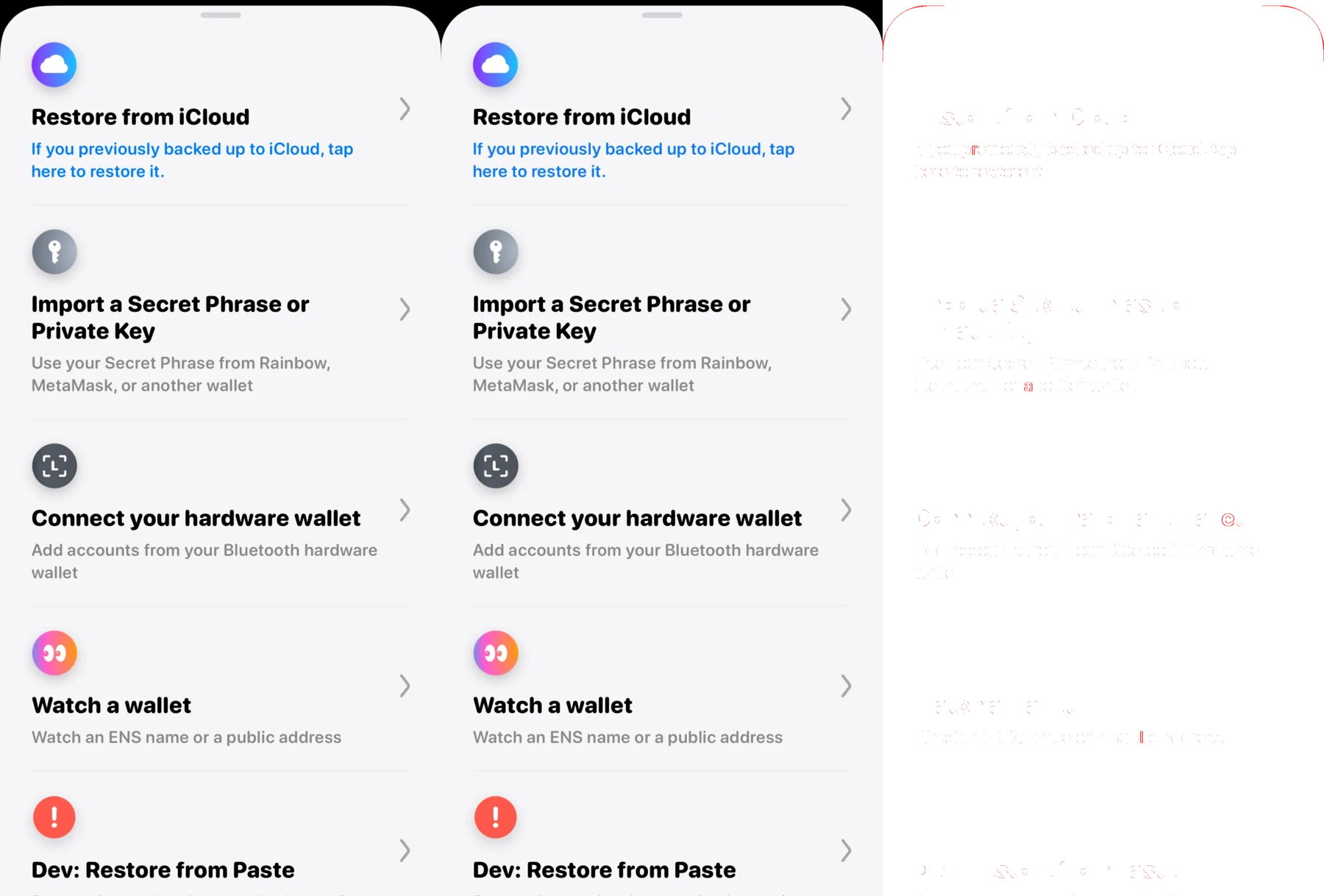
More than 60 unmodified open-source React Native apps have run in PeachSim, including the 26 apps from the October 21 snapshot plotted below. On every screen of each, at least 99% of pixels match an iOS 27 capture, and 12 apps clear the stricter 99.75% bar on every screen. As of this site’s build, the real apps page lists 59 apps across 293 screens, each within 1% of native.
Every app draws on the same engine fixes, so each came faster. The first took about a month to match, the second two days, and later apps half a day each on average.
Packages and system surfaces
The suite also covers 56 packages and the system surfaces they invoke, including SwiftUI controls through Expo UI, Apple Pay buttons, context menus, sheets, the system keyboard, charts, images, and maps. Of 674 visual checkpoints and 234 semantic checkpoints, 559 visual captures sit within 1% of iOS and 166 are pixel-identical. A package’s update post publishes only when its visual score reaches 99% or higher.
Liquid Glass case study
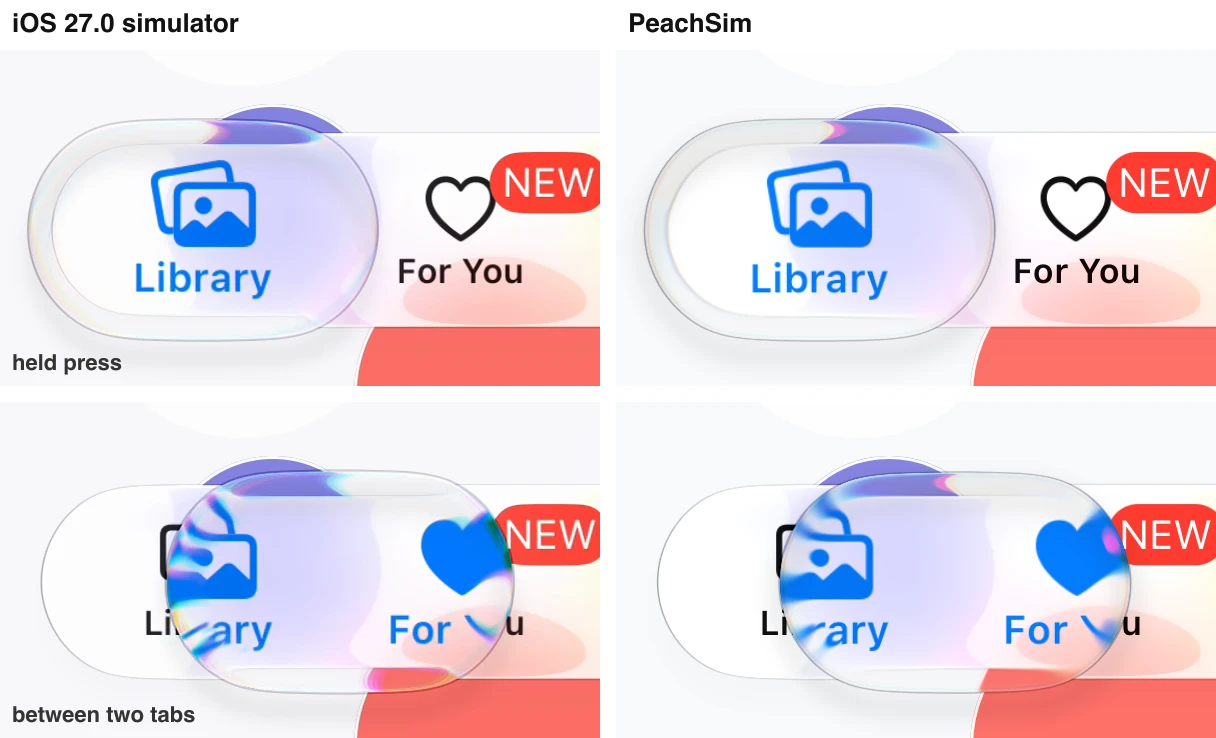
When pressed, the iOS 27 tab bar lifts its selection into a clear lens that refracts and magnifies the content beneath and follows the finger on independent springs. Matching that one control meant reproducing its shader pipeline and its two-spring motion against frame-locked native captures.
The lens is a signed distance field, which gives each pixel’s distance to the edge of a continuous-corner capsule. From that distance and the outward direction, a shader refracts a backdrop blurred at several scales, magnifying the center, bending icons at the rim, and separating red and blue into a faint fringe. Four highlight bands light the perimeter, and a color matrix blends the result in gamma-encoded sRGB.
During a drag, two independent springs drive the lens’s center and its width, with movement responses of 0.2 and 0.3 seconds and 0.85 damping on both. Deriving the left and right edges from center and width keeps a change in tab width from pulling the center off its path.
Tracking accuracy across four builds



A build is graded on both the share of pixels that differ and how far off each one is. The October 11 build drew the lens as an opaque white fill that hid the icon beneath. Its share of differing pixels fell from 26% to 16% while mean channel error rose from 8.0 to 10.1.
Remaining differences
In the October 26 build, the lens body is slightly paler than native and its chromatic rim weaker. When the lens straddles two tabs, iOS draws the incoming tab’s glyph at full tint opacity under the lens mask where PeachSim draws it pale, and the drag position trails native by a few points. In dark appearance the tab bar is still brighter than native. A separate checkpoint grades how the bar shrinks as the page scrolls.
Performance
PeachSim finishes automated UI test flows in a fraction of the iOS Simulator’s time, and its compositor works well inside the 8.33 ms frame budget of a 120 Hz display. On the same machine, a one-tap Maestro test took 1.5 s against 11 s, and a four-screen Bluesky flow took 9.9 s against 24 s.
Over a 12 s run of Liquid Glass motion at 120 Hz, the compositor averaged 1.75 ms of work per frame, with a 95th-percentile interval of 9.89 ms between displayed frames. A missed refresh at 120 Hz shows as an interval near 16.7 ms, and the harness estimated zero misses.
Comparing the July and October builds
To measure the combined effect of Skia Graphite on WebGPU and the C++ compositor, we ran the July 26 build (stock CanvasKit on WebGL with a TypeScript tree walk) beside the October 26 build, under identical touch traces in Chromium 149 on an M3 Ultra. On an idle home screen the July renderer spent 520 ms of CPU in every 2 s window, because it redrew the whole canvas on every clock tick. The October compositor tracks damaged regions and reuses cached pictures of promoted layers. Idle CPU fell to 39 ms, 13.3 times less, and cold-boot renderer CPU fell 36%.
Frame delivery improved as well. During a navigation back swipe, the share of display refreshes that received a new frame rose from 44.9% to 75.3%, and median frame time fell from 33.3 ms to 16.7 ms. Resident memory after boot went the other way, from 694 MB to 1,067 MB, to hold precompiled GPU pipelines and retained backing textures.
Precompiling GPU pipelines
A GPU pipeline pairs a compiled shader with the exact blend, clip, and attachment state of a draw call, and compiling one on first use stalls the frame. On WebGL those stalls ran 100 to 250 ms and yielded to targeted warm-up draws. On Skia Graphite, a first-use compile inside a flush blocked Chrome’s entire GPU process for 40 to 600 ms.
Broad synthetic warm-up draws made startup worse and froze one boot for 13 seconds, because they warmed pipelines that real screens never requested. PeachSim instead captures the exact pipeline descriptions used in real app flows, ships them with the engine, and compiles them at boot, which cut first-visit compiles from 91 to 0.
WebKit hid its share of that cost for a month, because our early Safari benchmarks ran with a warm shader cache. With the cache emptied before each run, a true first visit took 19.1 seconds to paint the home screen, against 0.64 seconds warm. WebKit compiles pipelines serially and builds Metal state only on the first draw, so we cut the home screen from 73 pipelines to roughly 42 and had helper workers compile and draw each one off the compositor thread. A true first visit now takes 3.5 to 4.4 seconds.
Largest single optimizations+
Defects in our measurement harnesses+
Several apparent engine regressions or gains turned out to be bugs in the measuring tool.
- JulyMeasuring the wrong workerThe default frame-rate readout watched the tenant worker, which never paints, reporting 2,069 frames a second during a visibly janky scroll.
- JulyA cache that never engagedA layer raster cache did nothing for months because a single tall virtualized list owned its boundary. The compositor now counts every cache rejection by reason so a cache that stops engaging shows up immediately.
- JulySoftware GPUsHeadless Chromium renders on a software GPU that overstates every drawing cost. Benchmarks moved to GPU-backed browsers on real hardware.
- SeptemberThrottling that missed workersChrome’s built-in CPU throttle slowed the main page 3.88 times while slowing a dedicated worker only 1.03 times, leaving PeachSim’s worker threads nearly untouched. We replaced it with an OS-level CPU limit that constrains every worker and refuses to run on a busy machine.
- SeptemberCounting hitchesIdentical touch traces replay in Chrome and Safari to count missed 60 Hz refreshes against an interleaved control build that must show no gain. Passing requires zero missed ticks.
- OctoberWarm shader cachesUntil a dedicated harness emptied the operating system shader cache before launch, every WebKit first-visit benchmark had measured a warm cache.
- OctoberLimits of OS CPU throttlingAn OS-level CPU limit also slows the display clock, stretching an empty page’s frame interval to 167 to 200 ms. We use it to estimate mobile CPU cost and never to judge frame cadence.
Optimizations that did not move the numbers+
Compiled native code
An app’s JavaScript and its packages run unchanged, and the engine supplies the native side beneath them. PeachSim also compiles original Swift, Kotlin, Objective-C, and Nitro C++ source to WebAssembly against clean-room system frameworks.
For most of the year we wrote every native module by hand. That works one package at a time, leaves a long tail of dependencies uncovered, and offers nothing for apps written in Swift. In September we began compiling upstream native source and implementing the operating system frameworks beneath it.
- MayHand-written native modulesPackage JavaScript runs unchanged while PeachSim supplies each TurboModule or native view, written by hand to match its iOS and Android behavior.
- Sep 14SwiftUI in WebAssemblyWe compiled a SwiftUI module to WebAssembly with the swift.org toolchain and mounted it in the tenant worker with working state, events, and reload.
- SeptemberApple SDK frameworksWe implemented CoreGraphics, MapKit, Charts, and StoreKit, followed by initial versions of UIKit, Combine, SwiftData, WebKit, and AVFoundation alongside upstream swift-foundation.
- Sep 26Kotlin and ComposeWe compiled Kotlin to WebAssembly, brought up real Compose state, and booted pure Kotlin Android apps with no JavaScript at all.
- Oct 2UIKit beneath SwiftUIWe graded core UIKit views against iOS 27, and local Swift Expo modules began compiling automatically against a port of the Expo Modules API.
- Oct 13Complete Swift sample appApple’s Landmarks sample matched iOS 27 on an iPhone 17 Pro profile across all 20 screens, with 0.15% to 0.90% of pixels differing.
- Oct 10 to 20Nitro ModulesWe linked the unmodified Swift and C++ generated by Nitro Modules, matched native records for calls, promises, callbacks, identity, and disposal, and compiled a published Nitro package from its original sources.
- Oct 23Objective-CWe compiled upstream Objective-C sources to WebAssembly, opening a path to the older half of the React Native package catalog.
Swift support is in beta, and Kotlin and Compose are at an earlier stage. On Android, compiled Compose code records its draw passes into Skia pictures for PeachSim’s compositor, which avoids bundling a second copy of Skia. Most packages from Expo, Software Mansion, and Callstack still run on hand-written modules while we move them to compiled upstream sources.
Browsers and native hosts
PeachSim runs in desktop and mobile browsers and as a native app on Mac, Linux, and iOS. Every target shares one rendering engine, and a native host frees the compositor from the browser’s frame clock.
We built and measured PeachSim mostly in Chrome for the first three months. Safari on iPhone became our primary target by July, because mobile memory limits and WebKit quirks were the hardest problems. In October we added native hosts so the compositor could pace frames from the display clock.
On a 120 Hz Mac, a stock WebKit view caps page rendering near 60 Hz and worker callbacks near 56 Hz, so more than half of all refreshes show a stale frame. The Mac app keeps WebKit for the surrounding page and runs the compositor in its own JavaScriptCore context on the display link, which held 120 of 120 frames per second in our first prototype through 200 ms stalls on the page. The Linux app uses the same split over Vulkan. iOS disallows executable memory, so the iOS app compiles the renderer’s WebAssembly ahead of time to C, with identical output.
The iPhone memory ceiling
iOS terminates a Safari tab that crosses its memory limit, which neither macOS nor the iOS Simulator enforces. Our estimate of that ceiling moved from a few hundred megabytes to roughly 2 GB, then settled near 1.5 GB on most iPhones. A test rig now terminates the page at that limit and tracks graphics allocations separately from process memory.
Largest memory reductions+
Defects in underlying runtimes
A display compositor exercises browser code paths that ordinary pages rarely reach. We worked around more than 30 defects and undocumented behaviors across V8, WebKit, Skia, Dawn, and GPU drivers. One intermittent V8 crash looked like a race in lazy compilation until 750 fresh boots per configuration showed every variant still crashing once in every 100 to 400 boots at the same instruction sites. A minimal reduction on unmodified CanvasKit reproduced it.
Selected upstream defects+
Remote simulators
A remote simulator runs the app on a server in a headless, CPU-only runtime and streams compact binary scene updates to the browser. The viewer’s Skia Graphite compositor renders them locally and sends pointer, scroll, and keyboard events back over the same socket.
Each stream carries view-tree deltas, Yoga layouts, font faces, system UI requests (alerts, sheets, keyboard traits, and permission prompts), and descriptors for native-driven animations. One viewer at a time holds the input lease, the exclusive right to send input, while others watch.
Streaming scenes instead of video
Adaptive playout buffering
Packets arrive in bursts, so the host timestamps each scene commit. While the app is in motion, the viewer holds commits in a playout buffer and delays them by the minimum recent transit lag plus 95th-percentile jitter, capped at 50 ms, so frames appear at the host’s cadence. When the scene is still, commits skip the buffer, which adds zero latency to tap feedback.
Replaying a 60 Hz stream through measured network jitter, the playout buffer cut missed display slots from between 10 and 22 to between 2 and 8. Before a session starts, the host and viewer check matching hashes for the wire subprotocol, engine, renderer, fonts, and assets. A 30-minute soak against production passed all 47 checks.
Interactive previews
A preview is a shareable scene recording for pull requests and bug reports. At any point on its timeline, the viewer can take over and drive the running app from that state.
Earlier preview designs+
- AprilVideo overlaid on a live canvasEarly previews bundled the app, network responses, and input events behind a recorded video, replaying those inputs on a live canvas when the viewer released the scrubber.
- JulyDedicated GPU runnerBecause standard CI machines lack GPUs, recording moved to a dedicated GPU runner that drove customer builds and encoded video.
- AugustPolled screenshotsThe initial hosted viewer polled the server for static frame images.
- SeptemberBinary scene streamStreaming an entire browser tab could not crop cleanly to the device bezel and required a second runtime, prompting a binary protocol that streams only simulator scene commits.
- OctoberScene recordings by defaultRecording that binary stream directly made scene playback the default share format, leaving video and the live bundle optional while allowing any machine to render video offline.
Recording without a GPU
A scene recording is a gzip-compressed PSR1 container of the exact binary frames a remote viewer receives, stamped with millisecond arrival offsets. It opens at t = 0 with a keyframe that resyncs the full scene and lists only the remote images actually drawn. Several seconds of interaction take tens of kilobytes of scene deltas plus 0.2 to 0.6 MB of WOFF2 fonts.
The container holds scene commits and no pixels, so a CI runner with no GPU can capture a take, and any machine can export video later by stepping a virtual clock at a locked 60 fps. A 562-frame flow at 1206 by 2622 pixels rendered in 15.6 s on a Mac and in 188 s on a Linux runner with no GPU, dropping zero frames.
Deterministic handoff to a live app
A running app holds state in JavaScript closures, timer queues, and native modules that cannot be serialized. When playback hands off to a live session, PeachSim rebuilds that state by replaying the recording out of sight. It boots the bundle in a hidden worker, restores the starting storage snapshot, waits for the recorded initial accessibility tree (roles, labels, authored IDs, and child order), replays input events and network responses up to the chosen timestamp, and swaps the live surface onto the screen.
What a recording omits
Engine evolution
Nearly every subsystem of the March prototype has been replaced at least once, and several twice. Each replacement had to match its predecessor pixel for pixel before the old path was deleted.
Architecture history by month+
- MarchCanvas rendering from day oneFrom the first commit, PeachSim drew through Skia’s CanvasKit and computed layout with Yoga, never rendering through the DOM. Everything above the canvas began as hand-written stand-ins, including a custom React reconciler, replacements for View, Text, ScrollView, and Animated, JavaScript stand-ins for Reanimated and Gesture Handler, and homemade copies of iOS system apps. Bluesky rendered its first screen on March 29.
- MarchA parallel Rust engineAlongside the JavaScript renderer, we built a second engine in Rust compiled to WebAssembly with its own layout, hit-testing, scroll physics, and draw opcodes. Although faster in layout benchmarks, it doubled the code that had to stay accurate, so deleting it in May left one layout engine and one renderer.
- AprilRunning upstream JavaScript unchangedHand-written copies of package JavaScript drifted from upstream releases, causing apps to load cleanly and then crash several screens deep on an invented return value or missing export. That failure established the rule PeachSim still follows, running upstream JavaScript unmodified and implementing only the native side beneath it. Through May we replaced every JavaScript stand-in with the real upstream package and a native module.
- AprilMoving off the main threadAn early worker prototype showed that canvas painting stayed responsive even while the main page was blocked. Within days we split execution into a tenant worker for the app and a shell worker for the system UI so a frozen app could no longer stall the home indicator, moving layout frames and animated values into shared memory two weeks later.
- JulyA dedicated compositor workerAdding a third worker dedicated to GPU rendering completed the four-context topology shown in Figure 3. Workers switched from sending full trees to streaming flat change lists, and nested live layers replaced the single flat recorded picture.
- AugustSkia Graphite on WebGPUWe replaced stock CanvasKit on WebGL with a patched build of Skia’s Graphite backend on WebGPU, bringing it up in Chrome first and in Safari four days later. That same month, exact pixel comparison became the default check against native simulators.
- SeptemberMoving frame execution to C++Per-frame work began moving out of TypeScript and into C++ compiled into the same WebAssembly module as Skia. In parallel, we began compiling SwiftUI apps to WebAssembly on the shared engine.
- OctoberNative hosts and compiled packagesThe compositor moved into native hosts on Mac, Linux, and iOS, drawing on Metal and Vulkan through Dawn, Chrome’s WebGPU implementation. At the same time, we began compiling packages’ upstream Swift, Objective-C, and Nitro sources in place of hand-written native modules.
Moving frame work into native code
Animated values drove the canvas directly, bypassing React, from the first week. In April springs became closed-form functions of time that any worker could sample, and in August animations became compact graphs sampled by the compositor. From September, per-frame work moved from TypeScript into C++ one subsystem at a time.
Subsystems moved to C+++
JavaScript still handles what runs on state changes, such as layout inputs, style resolution, typography, shader parameters, and asset selection, along with the app’s own Reanimated worklets. Compiled per-frame code matters most on native iOS hosts, where the operating system forbids runtime code generation and any JavaScript on the frame path runs in an interpreter.
Routes we measured and closed+
Each approach below was built far enough to measure under real workloads. We record every closed route, now more than a hundred, so nobody spends a week rediscovering a dead end.
Team Machine
AI coding agents wrote most of PeachSim, working concurrently across eight machines under one owner. We built Team Machine alongside the simulator to orchestrate those sessions, route decisions to the owner’s phone, and keep shared hosts healthy.
Team Machine month by month+
- MayTerminal wrapper and networkTeam Machine began as a pass-through terminal wrapping each coding agent, recording transcripts, maintaining a rolling summary with a smaller model, accepting input from other processes, and connecting machines from day one.
- JuneCross-platform control roomA single React tree powered web, native GPUI desktop, and TestFlight iPhone apps, each showing live summaries, a terminal for every session, and a unified cross-machine feed.
- JulyEncrypted fleet and synced policyConnections between machines gained transport encryption and device enrollment, backed by one synced repository deploying instructions, skills, and policies to every host.
- AugustOwner notifications and event waitsBlocking questions and shared results began routing to the owner’s phone while routine agent mail coalesced in the transport. After one session spent 82 minutes and 205 tool calls polling a single CI run, we added a command that sleeps on one exact condition.
- SeptemberSelf-managing hostsTeam Machine took over worktrees, isolated-index commits in shared checkouts, end-of-task resource teardown, capacity-based placement, and minimum disk floors, while a host gate began pausing the newest heavy job under load.
- OctoberStanding agent teamsStanding teams began starting themselves and handing off to fresh successors every 12 hours, alongside a shared Mac and Linux pool for heavy builds, automatic runtime deploys on push, and token accounting by lane and session.
Running an agent fleet
Work is divided into lanes. A lead agent runs each lane and directs its workers, and the owner directs the leads. Recurring operational failures move out of prompts and into code.
When a mistake kept recurring, we wrote a prompt rule, then a dedicated agent role if the rule drifted, and finally code in Team Machine or the repository, as an admission gate, an event watcher, a merge queue, or a lint check. The global agent contract shrank from 35 KB in July to 13 KB, with specialized procedures loading on demand as skills.
Eliminating chatty agent mail
Left alone, agents acknowledge receipts, announce starts, and send progress updates. Every message wakes its recipient for a full model turn, so a chatty fleet spends most of its tokens reading its own mail, and prompt rules could not stop it because each agent judged its own message useful. Team Machine now coalesces agent mail in the transport and records status on task cards that leads read on their loop. Agents send unprompted messages only when blocked.
Questions, shares, and approval
Agents reach the owner through two channels. A share pushes reviewable output to the phone, such as an annotated screenshot, a parity diff, or a video cut. A question pauses the session and states what happened, why it matters, the options, and a recommendation. Workers ask their lane lead first, and a relayed owner approval counts only when it quotes the owner’s exact words.
Evolution of the coordinator role+
- JuneRead-only companionThe coordinator began as an always-on session reachable from the owner’s phone, able to inspect every session across the fleet without starting work on its own.
- AugustSupervised advisorIt gained the ability to coordinate and recommend next steps, asking permission before launching any worker session.
- SeptemberStaffing managerWe inverted that rule so the coordinator stopped doing implementation work itself and staffed ready tasks up to available machine and account capacity, regardless of backlog size.
- OctoberConversational front doorOnce lane leads took over staffing their own lanes, the coordinator dropped its background loop and became the direct session the owner talks to.
Standing teams
In October the fleet moved to standing teams that launch and rotate themselves. Teams span two model families and pair a few large reasoning models with medium and small workers. Leads keep their lanes staffed to the available host cores, replace each worker in the turn it finishes, and hand off their own sessions every 12 hours.
Standing teams and responsibilities+
Operating rules
Open gaps
Method and sources
Conformance data comes from the visual proof snapshot generated on October 21, 2026 at 16:12 UTC on iOS 27.0 with an iPhone 16 profile, apart from the dated tab bar builds in the Liquid Glass section. Benchmarks come from dated records that name their host hardware. Engineering histories come from design documents and project records, dated by the change that introduced each step.
Third-party app agreement scores come from the acceptance table used to qualify demo apps. We recomputed the seven interactive comparisons in Figure 8 from saved captures with the conformance comparator.
References
- 01React Native, The New Architecture and the Fabric rendererreactnative.dev/architecture/fabric-renderer
- 02React Native, SpringAnimation.jsgithub.com/facebook/react-native/blob/main/packages/react-native/Libraries/Animated/animations/SpringAnimation.js
- 03Yoga layout engineyogalayout.dev/docs/about-yoga
- 04Skia CanvasKitskia.org/docs/user/modules/canvaskit/
- 05W3C, WebGPUwww.w3.org/TR/webgpu/
- 06WebAssembly Core Specificationwebassembly.github.io/spec/core/
- 07web.dev, Cross-origin isolation with COOP and COEPweb.dev/articles/coop-coep
- 08WebAssembly Binary Toolkit, wasm2cgithub.com/WebAssembly/wabt
- 09Apple, Liquid Glassdeveloper.apple.com/documentation/technologyoverviews/liquid-glass
- 10Apple, Hardened Runtimedeveloper.apple.com/documentation/security/hardened-runtime
- 11Software Mansion, Reanimated workletsdocs.swmansion.com/react-native-reanimated/docs/guides/worklets
- 12Maestro mobile UI testingmaestro.dev/